

Connect a store
Paste a URL and VEKZT builds your product catalog automatically.
Connecting a store is the first step in the VEKZT loop. VEKZT reads your public storefront, discovers your product pages, and extracts the titles, prices, descriptions, and images into a clean catalog that the rest of the workflow builds on. There is no app to install, no API keys to paste, and no theme change. VEKZT only reads what a shopper would see.
Supported platforms
VEKZT crawls Shopify, WooCommerce, and custom storefronts. How much it can pull depends on how your product data is published.
- Shopify, the deepest support. VEKZT reads the product data embedded in the storefront, so titles, prices, images, and variants come through cleanly.
- WooCommerce, extracted from the JSON-LD structured data most Woo themes publish on product pages.
- Custom stores, JSON-LD is the strongest signal when it is present. When it is not, VEKZT falls back to reading the page content heuristically.
Run the crawl
- Paste your store URLVEKZT discovers your product pages from your sitemap and page links, including sitemap references in your robots file, and shows a live count as it goes. Collection and category pages are followed with pagination, so deep catalogs are covered.
- Confirm to create the brandConfirming creates the brand workspace and queues the crawl, product extraction, and Brand Insights, all chained automatically. You do not run each stage by hand.
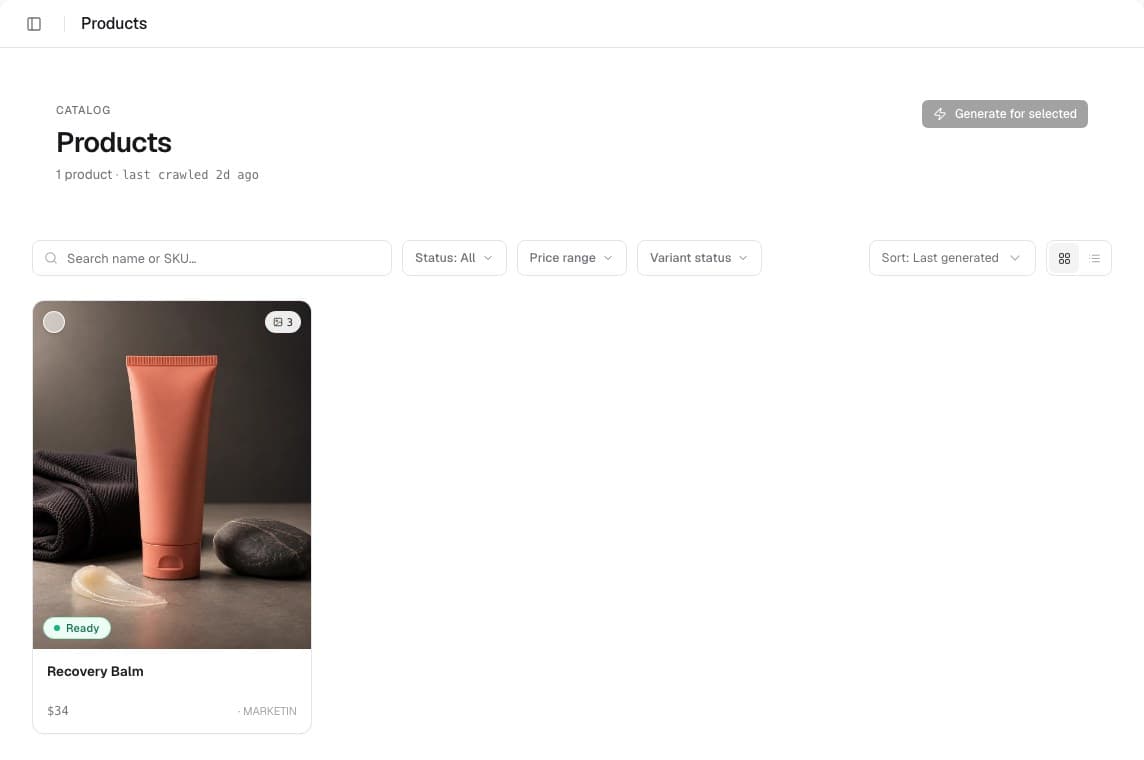
- Review the catalogOpen Products to spot-check what came through. You'll see images, titles, prices, and an extraction status per product.
What to expect
Processing time varies with catalog size and storefront structure. The brand hub pipeline shows crawl, extraction, and Brand Insights status, and a product count appears as extraction completes. If progress stops or no product count appears, use the guidance below or contact support. Crawling and extraction never cost credits, so you can connect a store and review the catalog before you generate anything.
Reading extraction status
Each product on the Products page carries a status so you can see the catalog quality at a glance.
- Ready, full data came through, including an image and a description.
- Partial, usually a missing image or description. The product still works, but the generated ad has less to draw on.
Re-crawling and freshness
When you add products or change your storefront, re-crawl from the brand hub to refresh the catalog. VEKZT flags Brand Insights as stale when your catalog grows meaningfully, so you know when to refresh those too. Re-crawling keeps the catalog and the brand profile in sync with what you are actually selling.